


Fly Delta
4.835.05K Reviews
App Specs
- Version
- 7.12
- Updated On
- License
- Free
- Downloads
- 10,000,000+
- Developer
- Delta Air Lines, Inc.
- Categories
- Travel & Local
- Platform
- Android, iOS
Screenshots



 Analysis by AppCompare
When I’m planning a trip on Delta, I want the practical details close at hand: where to find my boarding pass, what is happening with my flight, and how to keep the itinerary straight when the day gets busy. That is the role the Fly Delta app aims to fill. It is a free travel and local app from Delta Air Lines, Inc., and its focus makes the most sense for people who already expect to fly with the airline rather than travelers looking for one place to manage every carrier.
Quick access matters more than a flashy interface
The useful speed test for an airline app is not how quickly it opens on a quiet afternoon; it is whether I can get to the information I need without adding friction when I’m moving through an airport. Fly Delta brings travel management and flight information into one airline-specific place. That can save time compared with switching between an email itinerary, a browser, and a general travel app, particularly when I need to check my pass or confirm a flight detail.
I would still prepare before leaving home rather than treating any app as a substitute for planning. I’d sign in, check the trip details, and make sure I know where the boarding pass is before heading into a crowded terminal. That small habit reduces the number of steps I need to take when I’m juggling a bag, looking for signs, or dealing with a patchy connection. The app’s value is less about promising instant results and more about putting Delta-related tasks together.
Where a busy travel day puts it to work
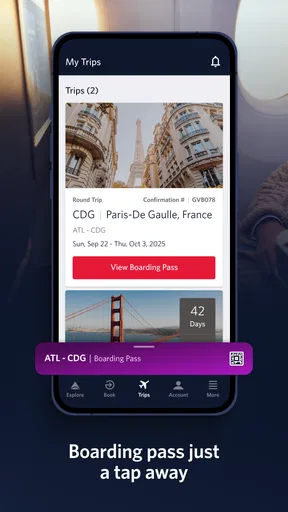
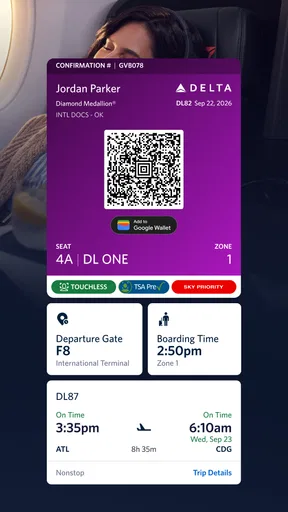
Picture a familiar scenario: I’m on my way to the airport, my plans are already in motion, and I need to verify the details of my Delta trip without searching through old messages. A dedicated airline app is useful here because the trip is the centre of the experience. I can use it as the place to keep track of flight information and access a boarding pass, then return to it as the journey progresses instead of rebuilding the picture from separate sources.
For a connection or a day with several travel decisions, I find it sensible to check the relevant details at natural pauses—before setting off, after reaching the airport, and when preparing to board—rather than repeatedly refreshing out of habit. That is a practical workflow, not a promise that every update will arrive at a particular moment. When timing matters, I’d also pay attention to airport announcements and signs. A phone is convenient, but it should not be the only source I rely on in a terminal.
A focused companion, not a universal trip planner
Compared with general travel apps, Fly Delta has a clear advantage when the trip is on Delta: its purpose is to help manage that airline’s travel rather than combine every provider into one broad itinerary. A general-purpose app can be a better choice for someone comparing many airlines or keeping hotel, ground transport, and flights from different companies together. I would use those tools for the wider holiday picture and keep Fly Delta for the Delta-specific part.
That distinction also explains who may want to skip it. If I rarely fly Delta, installing a dedicated airline app may not add enough value to justify another account and another place to check. If I do fly Delta regularly, or if a trip is already booked with the airline, having its app ready is a more direct option than relying only on confirmation emails. It is a focused tool, and I think it works best when used for that focused job.
Worth Reading Before You Choose

EA SPORTS FC Mobile 26 Is a Bigger Football Game, but It Takes Time

Flipboard Shows What News Apps Must Do Beyond the Feed

Switching to Android Auto Means Rethinking Your Driving Routine

Google Calendar Makes a Crowded Week Easier to Manage

Ludo King Makes the Most of the Minutes Between Plans

Baby Panda World Brings Quick Play to Modern Phones, but Its Game Library Feels Busy
Your Travel Companion
From the moment you log in, the Fly Delta app feels like a trusty sidekick, ready to guide you through every step of your journey. It’s super intuitive and packed with features that make flying less of a hassle and more of an adventure. Now, who wouldn’t want that?
Booking Made Easy
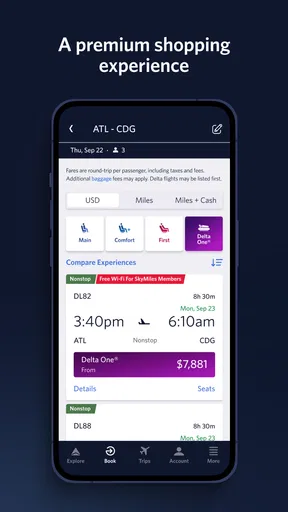
One of the first things you'll notice is how seamless it is to book a flight. With just a few taps, you can search for flights, compare prices, and snag that perfect seat. It’s like having a personal travel agent in your pocket. Plus, you can easily manage your bookings and make changes without breaking a sweat.
Stay Informed
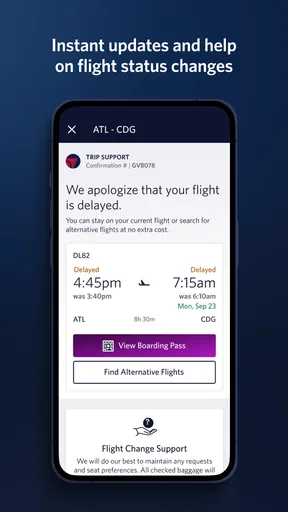
Flight notifications are a game-changer. The app keeps you updated with real-time alerts about gate changes, boarding times, and even baggage claim info. No more frantic sprints through the airport or standing around cluelessly. The app's got your back!
Still, I treat notifications as a prompt to double-check, not as a guarantee that I can ignore the surroundings. I keep an eye on airport displays and listen for announcements, especially if I’m changing terminals or moving away from the gate. That approach is useful with any airline app: the phone can make a change easier to spot, while the airport’s own signs help me orient myself once I’m there.
Sky Miles at Your Fingertips
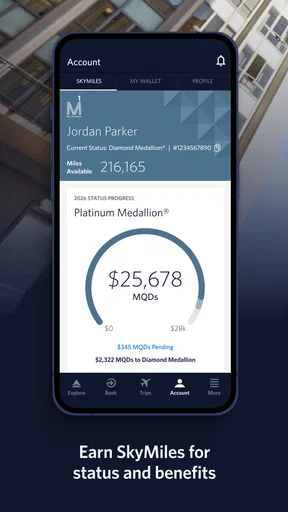
If you're part of Delta's SkyMiles program, the app makes it super easy to keep track of your miles and redeem them for rewards. You can view your account balance, check out your activity, and even find ways to earn more miles. Trust me, watching those numbers climb is oddly satisfying.
I’d see that account view as a handy companion to trip planning rather than the reason to install the app on its own. For someone who uses SkyMiles, checking the account while considering a Delta trip can keep travel and loyalty activity in one place. If I’m not interested in the program, that part is easy to set aside; the everyday value still depends on whether I need the airline’s travel tools.
In-Flight Perks
Once you're on the plane, the app keeps entertaining with its in-flight features. You can stream movies, TV shows, and music—all from your own device. It’s like having a mini theater at 30,000 feet. Just be sure to pack those earphones!
My practical advice is to treat entertainment as a possible extra, not the centre of the travel plan. I’d bring something else to read or listen to as a backup and make sure the phone has enough charge for the parts of the journey where I need it for travel details. That is a useful trade-off for any phone-based trip companion: the same device that helps me navigate a travel day is also the device I may want for downtime.
Airport Navigation
Ever found yourself lost in a massive airport? The app’s interactive maps help you navigate like a pro. Whether you’re looking for a coffee shop or your gate, it’s all there. No need to ask for directions or study those confusing airport signs.
Maps are most useful when I check the route before I start walking, rather than stopping in the middle of a busy corridor to work it out. I’d still use the signs as a cross-check, since terminals can be unfamiliar and a map is only one aid to orientation. If I have a tight connection or need help with a route, asking airport staff can be more reassuring than relying on a screen alone.
Reliability is a routine, not a promise
Fly Delta has a strong audience behind it: it holds an average rating of 4.8 from around 483,000 ratings, with about 32,000 written reviews and more than 10 million installs. Those figures suggest that many travelers have chosen to use it, but I would not treat popularity as proof that every session will be flawless on every phone or network. My own sensible approach is to check essential trip information before I’m under time pressure and to keep the boarding pass accessible when I need it.
If the app feels slow or an item does not appear immediately, I would avoid repeatedly tapping the same control. I’d pause, check the connection, and try again once; for an urgent travel question, I’d use airport signage or speak with airline staff rather than let troubleshooting consume the time I need to reach the gate. This kind of fallback is not a criticism unique to Fly Delta. It is a practical way to travel with any app that holds important trip details.
Device fit and everyday trade-offs
The current version is 7.6.1, and the app is listed for devices running Android 8.0 or later. That gives Android users a clear compatibility check before installing. It is also rated for Everyone, so its age classification is broad. As with any app used while travelling, I’d consider the condition of my phone as well as the software requirement: an older or nearly full device can make ordinary tasks less comfortable, and a low battery matters more when the phone is also carrying travel information.
I would keep the app updated when convenient, but I would not schedule an update at the airport just before boarding. Updating while connected to a dependable network and with time to spare is a calmer choice than changing the setup in the middle of a journey. If I’m travelling with limited battery, I’d reduce unnecessary screen use and keep a separate backup plan for essential details. These are small habits, but they make a phone-based travel routine less fragile.
Who gets the most from it
For a Delta regular, the strongest case is convenience across repeated trips: the same place can serve as a familiar starting point for booking and handling airline-specific travel tasks. A first-time Delta passenger can also benefit when an itinerary is already with the airline, especially if they prefer an app to searching through email. The free price makes trying it a low-commitment choice, though the benefit still depends on having a reason to use Delta’s own services.
For someone planning a multi-airline trip, I would not make it the only travel organizer. A general itinerary tool or a carefully maintained email folder may be better for viewing different carriers and non-flight reservations together. I’d use Fly Delta for the Delta leg and another method for the rest, instead of expecting one airline’s app to become a complete travel desk. That division keeps each tool doing the job it handles best.
My verdict after weighing the trade-offs
Overall, the Fly Delta app is most convincing when I judge it as a practical airline companion, not as an all-purpose travel platform. It brings useful Delta travel tasks together, and its large user base makes it a familiar option for many passengers. The sensible limits are just as important: it is primarily valuable to Delta customers, phone access depends on the device being ready, and I would still cross-check important airport information when timing is tight.
Delta Air Lines, Inc. released the app on February 14, 2011, and its continued presence in the travel category reflects a long-running role in the airline’s digital experience. I’d recommend it to a friend who has a Delta booking or flies with the airline often, while suggesting a broader travel organizer to someone coordinating several carriers and reservations. Used for the right purpose and paired with ordinary airport awareness, it can make the travel day easier to manage without asking the phone to do everything.
Pros
- User-friendly interface for easy navigation.
- Real-time flight status updates.
- Seamless boarding pass integration.
- Loyalty program management within app.
- In-app notifications for gate changes.
Cons
- Limited features without internet connection.
- Occasional app freezes reported by users.
- Slow response time during peak hours.
- Complex features may confuse new users.
- Limited customization options for alerts.
FAQs for Fly Delta
What features does the Fly Delta app offer?
The Fly Delta app provides a comprehensive suite of features designed to enhance your travel experience. Users can book flights, check in, view boarding passes, and track luggage. Additionally, the app offers real-time flight updates, airport maps, and integrates with your Delta SkyMiles account for easy access to rewards.
Can I use the Fly Delta app offline?
While the Fly Delta app requires an internet connection for most functions, like booking flights or accessing real-time updates, some features are available offline. For instance, once downloaded, your boarding pass can be accessed without a connection. However, ensure your app is updated and synced before going offline.
How does Fly Delta handle flight changes and cancellations?
The Fly Delta app allows you to efficiently manage flight changes and cancellations. Simply navigate to your itinerary and use the modify or cancel options. The app will guide you through available choices, including rebooking or refund options. It's a convenient way to handle unexpected changes in your travel plans.
Is my personal information secure on the Fly Delta app?
Delta prioritizes user security and implements robust measures to protect personal information. The Fly Delta app uses encryption and secure connections to safeguard your data. Additionally, regular updates ensure compliance with the latest security standards. Always download the app from official sources to maintain security.
Does the Fly Delta app support international travel?
Yes, the Fly Delta app supports international travel. It provides essential features for global travelers, such as currency conversion, passport scanning, and visa information reminders. Furthermore, real-time updates for international flights and access to in-flight entertainment options enhance your global travel experience.


